Play a demo spin in six steps
Joker X uses a familiar five-reel, three-row interface. The game’s official manual notes that exact button placement may differ between versions and devices.
Launch the demo
Go to the Joker X slot overview and open the free-play game. Virtual credits let you learn without a monetary payout.
Open HELP before playing
Use the question-mark or HELP button to view the win plan, symbol payouts, line diagrams and game rules for the loaded version.
Find CREDIT, LINES and BET
The game display identifies your credits, active line count and stake. The reviewed interface shows 20 lines. Confirm which amount represents the total stake in your version.
Change the bet
The −/+ BET control changes stake size. Some versions include MAX BET or autoplay; using either increases the importance of checking the displayed total before proceeding.
Press START / spin
The reels stop and eligible line combinations are highlighted. A Joker multiplier on the third reel can substitute for other symbols and multiply winnings randomly from 2× to 5×.
Review the result
Any win is credited according to the game. If an optional Gamble control appears, choosing it may risk the already-awarded win; collecting preserves that win instead.
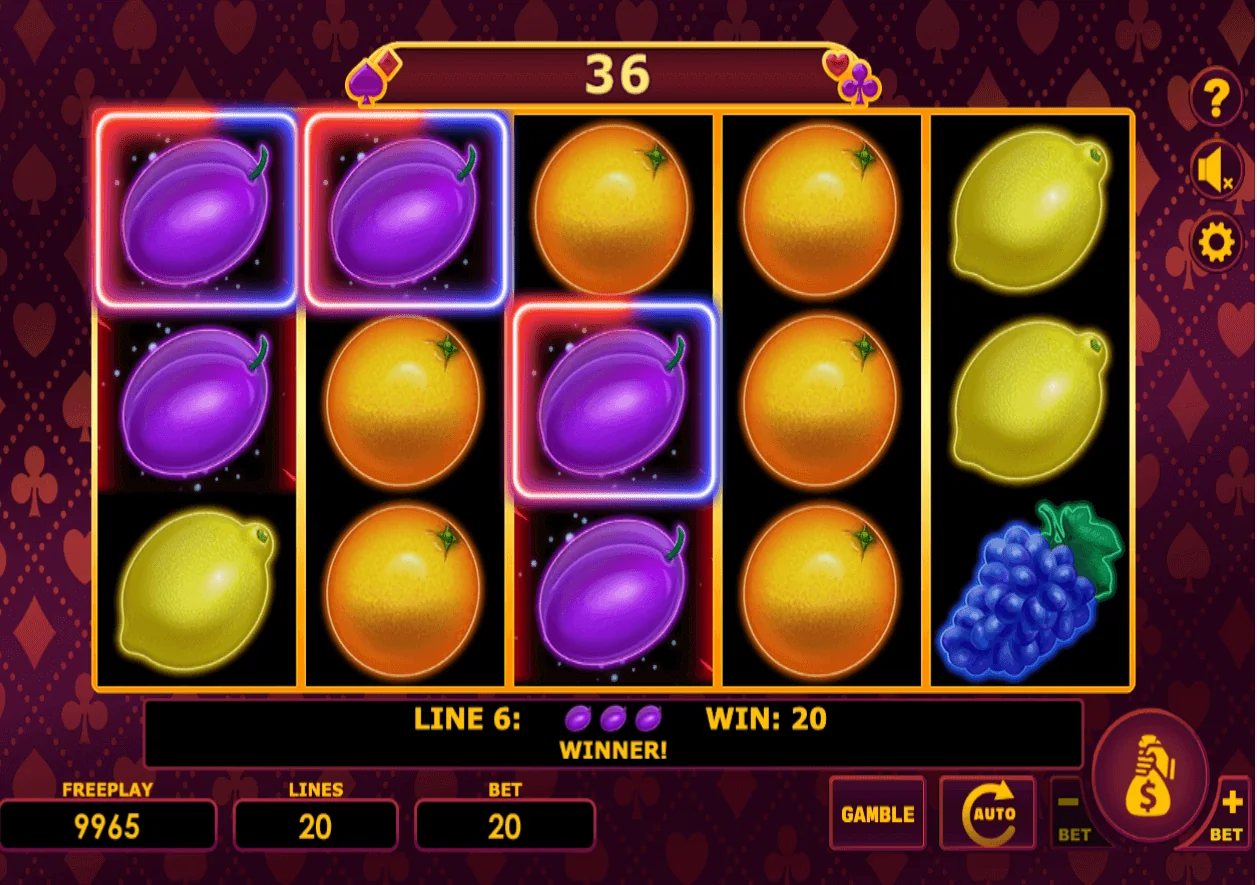
Joker X button and display reference
These control names come from the Amatic game manual. The casino or device may show slightly different icons or placements.
| Control | Purpose | What to check |
|---|---|---|
| START | Begins a spin. | Confirm the selected wager first. |
| −/+ BET | Changes the current stake. | Watch the total bet display. |
| MAX BET | Selects maximum available stake. | May be significantly above your intended limit. |
| AUTOPLAY | Starts repeated automatic rounds if enabled. | Review stop limits and session spending. |
| HELP (?) | Opens the paytable and rule pages. | Confirm line patterns and special-symbol behaviour. |
| SETTINGS / SOUND | Game settings and audio. | Options depend on device and version. |
| CREDIT / LINES / BET | Shows balance, lines and selected stake. | These are information displays, not outcomes. |
How do you read a Joker X winning spin?
Joker X has 20 fixed paylines, evaluated from left to right. Once the reels stop, the game highlights eligible combinations and adds the resulting payout to the displayed credits. The exact symbol requirements and awards must be read from the current paytable.
The middle reel matters because the Joker multiplier symbol appears on reel three. Its documented effect is substitution plus a randomly determined 2×–5× multiplier on winnings. For visual examples, use the symbols and paylines reference.
What does the optional Gamble feature do?
The supplied content document describes a post-win gamble option that may be available depending on the casino version. The supplied screenshots also show a GAMBLE control. It is a separate risk decision, not a technique for improving random slot outcomes.
| Decision | Implication |
|---|---|
| Collect | Keep the awarded win without exposing it to an additional gamble. |
| Gamble | Risk the existing award for a chance of a larger one; losing can remove that award. |
| Skip feature | Continue normal play according to your session limits. |
The exact gamble rules, limits and availability are version-dependent; review the in-game HELP menu.
Playing on mobile
The five-by-three arrangement makes Joker X relatively easy to recognise on smaller screens, but game providers may reposition controls or render a different interface. Keep the device in the supported orientation, verify the stake after any layout change and avoid rapid repeat spins that make it hard to follow spending.
Mobile autoplay or sound settings may differ from the desktop screenshots. Use HELP rather than assuming identical button positions.
Common beginner mistakes
- Assuming a screenshot stake is the default stake everywhere.
- Skipping the paytable and misunderstanding which symbols pay.
- Believing a loss makes a future win more likely. Each spin is chance-based.
- Using MAX BET or autoplay without setting a spending limit.
- Gambling a win without reading the separate feature rules.
Documentation used
- Amatic Joker X game manual — controls, win display, HELP menu and multiplier.
- GrandX Joker X information — paylines and layout.